


Toshiba BX-series: New generation of industrial label printers – Now supported by IPI
the new generation of industrial label printers for maximum performance
De Zebra ZD421 desktop labelprinter is een compacte barcode printer voor het printen van labels, verzendlabels en productlabels in logistiek, magazijnen, retail en productie.
In logistieke processen wordt de Zebra ZD421 ingezet voor snelle labelverwerking en efficiënte verzending.
Technische specificaties
Zebra ZD421 desktop labelprinter
Systeem
• Printtechnologie: Direct Thermal of Thermal Transfer labelprinting
• Processor: krachtige Dual-core CPU voor snelle labelverwerking
• Geheugen: 2 GB Flash geheugen voor templates, fonts en firmware
• RAM: 1 GB SDRAM voor snelle verwerking van grote printjobs
• Besturingssysteem: Zebra printer OS met uitgebreide compatibiliteit
• Firmware-emulaties: ZPL II, EPL, DPL en SBPL voor eenvoudige integratie
De krachtige hardware zorgt ervoor dat de ZD421 barcode labelprinter probleemloos integreert in bestaande label- en ERP-systemen.
Media & labelverwerking
• Mediatype: labels, tags en continue media
• Maximale rolbreedte: ±120 mm
• Media sensor: transmissie- en reflectiesensor
• Lintcapaciteit: tot 600 meter (thermal transfer modellen)
• Automatische media-detectie: snelle configuratie van labelrollen
Ondersteunt diverse labeltoepassingen zoals e-commerce verzending, productidentificatie en magazijnlabels.
Connectiviteit
Printprestaties
• Printresolutie: 203 dpi voor scherpe barcodes en tekstlabels
• Maximale printsnelheid: tot 355 mm per seconde
• Maximale printbreedte: 104 mm
• Maximale printlengte: tot 1498 mm
• zorgt voor scherpe barcodes en duidelijke labelprinting in logistieke toepassingen
Met zijn hoge printsnelheid en betrouwbare printkwaliteit is de Zebra ZD421 perfect voor intensief labelprinten in magazijnen en productieomgevingen.
• Warehouse en logistieke magazijnen
• Productie en industriële labeltoepassingen
• Supply chain en verzendlabels
• Transport en distributie
• Retail en distributiecentra
Dankzij zijn veelzijdigheid is de ZD421 een van de meest gebruikte desktop labelprinters voor professionele barcode- en verzendlabels.
De printer wordt dagelijks ingezet voor labelprinting in logistiek, verzending en productidentificatie.
• USB 2.0 standaard aansluiting
• Ethernet (LAN) voor netwerkprinten
• USB host voor randapparatuur
• Optioneel: Wi-Fi, Bluetooth en seriële interface
Display & bediening
• Groot kleurentouchscreen voor eenvoudige bediening
• Intuïtieve gebruikersinterface voor snelle configuratie
• Status-LED indicatoren voor printerstatus en foutmeldingen
• Directe printerconfiguratie via het display
Hierdoor kunnen gebruikers de labelprinter snel installeren en beheren zonder technische kennis.
Robuustheid
• Robuuste desktopconstructie voor langdurige betrouwbaarheid
• Ontworpen voor dagelijks professioneel labelprinten
• Betrouwbare prestaties bij middelgrote printvolumes
• Ideaal voor magazijnen, logistiek, productie en retail
Advantages of the Toshiba BX400 and BX600
The Toshiba BX400 and BX600 series represent the latest generation of industrial label printers for demanding production, logistics and warehouse environments.
As successors to the popular B-EX series, these models offer higher performance, improved connectivity and maximum reliability for continuous label production.
-
Available in 4-inch (BX400) and 6-inch (BX600) versions
-
Ideal for logistics, production, distribution and warehouses
-
Support for various label materials
-
Low Total Cost of Ownership (TCO)
-
Reliable 24/7 industrial performance
-
Suitable for barcode labels, pallet labels, shipping labels and industrial identification
Applications of the Toshiba BX400 and BX600
The Toshiba BX series is perfect for:
-
Warehouse & logistics labeling
-
Supply chain tracking
-
Production and industrial labeling
-
Transport & distribution
-
Retail distribution centers
Deze printer ondersteunt bedrijven in het efficiënt verwerken van verzendingen, voorraadbeheer en productidentificatie.
✔ Higher print speed & processing power
The BX400 (4 inch) and BX600 (6 inch) combine powerful processing with high print speeds, enabling large label volumes to be processed faster and more efficiently.
✔ Improved connectivity
Extensive connectivity options such as USB, LAN and optional WiFi or Bluetooth ensure easy integration within existing ERP, WMS and production environments.
✔ Advanced printing technology
Thanks to enhanced printhead technology, the BX models deliver razor-sharp barcodes, text and graphics – essential for traceability and supply chain optimization.
✔ Sustainable and industrial design
The robust metal housing makes the printers suitable for intensive industrial use. Designed for minimal downtime and maximum lifespan.
✔ Backward compatibility
Easy migration from previous Toshiba B-EX models thanks to compatibility with existing media and ribbons.
Deze printer helpt bedrijven bij het efficiënt verwerken van verzendingen, voorraadbeheer en productidentificatie.
Technical positioning
-
BX400 – 4-inch industrial label printer
-
BX600 – 6-inch industrial label printer for larger label widths
-
Suitable for high print volumes
-
Low Total Cost of Ownership
-
Designed for continuous industrial use
Deze desktop barcode printer wordt vaak gebruikt in magazijnen en logistieke omgevingen waar dagelijks labels worden geprint.
Complete oplossing voor verzendlabels
Deze labelprinter wordt vaak gebruikt als onderdeel van een complete oplossing voor het printen van verzendlabels. In combinatie met de juiste etiketten en software kan het volledige verzendproces geautomatiseerd worden.
Advantages of the Toshiba BX400 and BX600
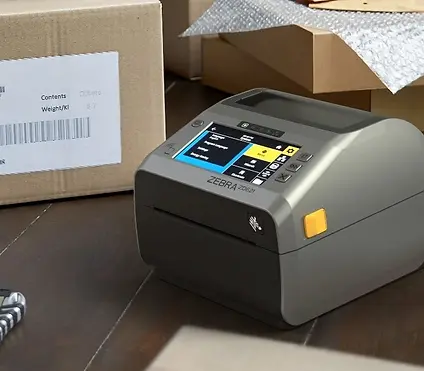

Zebra ZD421 desktop werkpaard
A BX410T is already available from €1,100.00 excl. VAT
More label printers
You can also view these pages for more professional barcode scanning solutions:
Learn more about how label printers work
You will find extensive information about this in our knowledge base:
👉 View all articles in our knowledge base about barcode scanning